Free AI tool

LinkedIn Carousel Generator

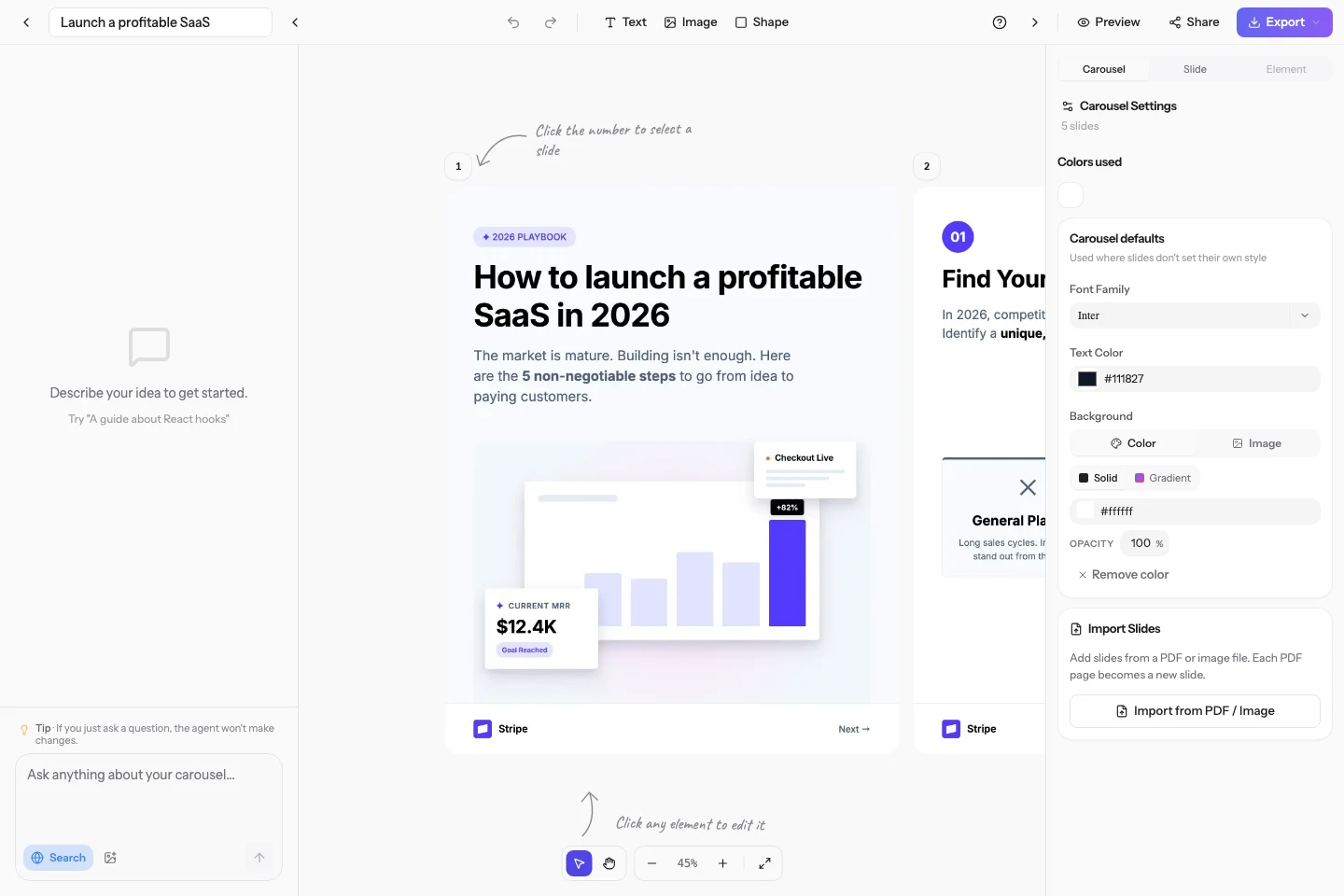
Describe your idea in one line. The AI writes the copy and designs every slide in the same pass, at LinkedIn's native 1080x1350, ready to export as a PDF or publish straight to your feed.

Try

4.9 from 17 reviews986 carousels created522 creators10 free credits, no card needed

What is a LinkedIn carousel generator?

A LinkedIn carousel generator is a tool that turns a topic into a multi-slide document post, the format LinkedIn shows as a swipeable PDF. Carousels Generator is an AI carousel generator that produces both the text and the design in one pass: you describe a subject, it returns 7 to 12 finished slides at 1080x1350 pixels that you can edit in the browser, apply your brand colours and fonts to, then export as a PDF or publish directly to LinkedIn. Most tools in this category hand you a blank template to fill in; this one writes the content too.

How to make a LinkedIn carousel

  1. 1

    Describe the carousel you want in one sentence, or paste a link, a blog post or a rough outline to work from.

  2. 2

    The AI drafts the copy and lays out every slide together, so the words and the design fit each other instead of being bolted on afterwards.

  3. 3

    Refine anything by chatting with it, apply your brand kit, then export a LinkedIn-ready PDF or publish straight to your feed.

LinkedIn carousel specs

Slide size1080 x 1350 pixels, the portrait size LinkedIn gives the most screen space to.
Aspect ratio4:5 portrait. 1:1 square also works but loses about 25% of the vertical space on mobile.
Slide count7 to 12 slides. Below 7 the post reads thin, above 12 completion rate drops.
Export formatPDF for the LinkedIn document post, plus PNG and a public share link.
PriceFree to start, no credit card. Paid plans add web search, no watermark and higher volume.

Carousels Generator vs a template tool

CapabilityCarousels GeneratorTemplate tools (Canva and similar)
Writes the slide copy for youYes, from a one-line promptPartly, an AI writing assistant, but you place the text slide by slide
Designs the slides for youYes, generated with the copy in one passYes, but you pick and fill a template
Applies your brand automaticallyYes, imported from your website URL or a PDFPartly, brand kits on paid tiers, applied by hand
Publishes straight to LinkedInYes, on every plan including FreeYes, from its content planner

Questions, answered

Is the LinkedIn carousel generator free?

Yes. You get free credits at signup with no credit card, which is enough to generate and export real carousels. Paid plans exist for volume, web search grounding and removing the watermark, but nothing is gated behind a trial to get your first carousel out.

What size should a LinkedIn carousel be?

1080 x 1350 pixels, a 4:5 portrait ratio. That is the largest vertical footprint LinkedIn gives a document post in the mobile feed. Square 1:1 works too, but it costs you about a quarter of the visible area. Every carousel here is generated at 1080 x 1350.

How do I post a carousel on LinkedIn?

Export the carousel as a PDF, then use the Document option when you create a LinkedIn post and upload the file. LinkedIn renders it as a swipeable carousel. You can also connect your account here and publish directly, caption included, without leaving the editor.

Do I need design skills?

No. The design is generated along with the copy, so there is no blank canvas and no template to pick. If you want to change something, you can either say so in the chat or move things around in the visual editor.

Can I use my own brand colours and fonts?

Yes. Paste your website URL or upload a PDF and the AI extracts your colours, typography and visual style into a Brand Kit, which is then applied automatically to every carousel you generate.

Keep going

Generate your first LinkedIn carousel

10 free credits at signup. No credit card required.